The Tech Learning Academy

The Tech Learning Academy

How to Remove Cortana from Windows 10

Ryan Kennedy's avatar
Ryan Kennedy
Jul 26, 2021
∙ Paid

Hello SavvyFam. Here is a quick guide on how to remove the annoying Cortana from your Windows 10 PC. Do you even use Cortana, like this post if this helped.

Share

How to Remove Cortana from Windows 10

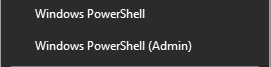
  1. Right-click on your Windows start menu

    Then, choose Windows PowerShell (Admin)

    At the prompt, type the following command: Get-AppxPackage Microsoft.549981C3F5F10 | …
User's avatar

Continue reading this post for free, courtesy of Ryan Kennedy.

Or purchase a paid subscription.
© 2025 Ryan Kennedy · Privacy ∙ Terms ∙ Collection notice
Start your SubstackGet the app
Substack is the home for great culture